
GHL Workflow Automation Breakdowns
Real automation workflows built in GoHighLevel — showing trigger logic, step sequences, and how each action moves a lead from inquiry to closed deal without manual follow-up.
Solar Assessment — Form Submission Workflow
Triggers the moment a prospect submits the Solar Assessment form — instantly creating an opportunity in the CRM, tagging the lead, notifying the team, and sending a confirmation to the contact.
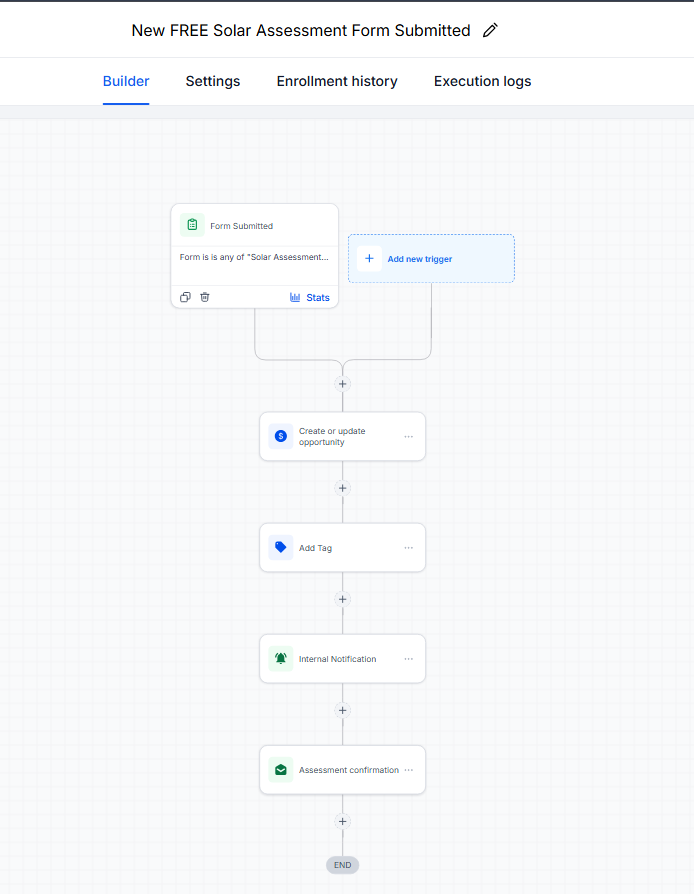
Click to zoom · Solar Assessment Workflow
Instant Response When a Lead Comes In
Most businesses lose leads in the gap between form submission and first contact. This workflow closes that gap by doing 5 things automatically — in seconds — the moment a prospect raises their hand.
No lead sits untagged. No team member is left uninformed. No contact goes without acknowledgement. The moment the form is submitted, the system takes over.
Speed-to-Lead Is Everything in Solar
Studies consistently show that the first company to contact a new lead wins the deal more than 70% of the time. Without automation, a lead who submitted at 8 PM might not get a response until the next morning — by which point they've already talked to a competitor.
This workflow ensures that every single lead is acknowledged instantly, tagged correctly, logged in the pipeline, and has a human being following up within minutes — automatically, every time.
Key Takeaway
This workflow turns a passive form submission into an active sales process — instantly. The lead is tagged, the opportunity is created, the team is notified, and the contact is confirmed, all without anyone lifting a finger.
Booked Appointment — Reminder Workflow
Activates the moment an appointment is booked — confirming immediately, notifying the team, then sending a timed reminder sequence to ensure the prospect actually shows up.
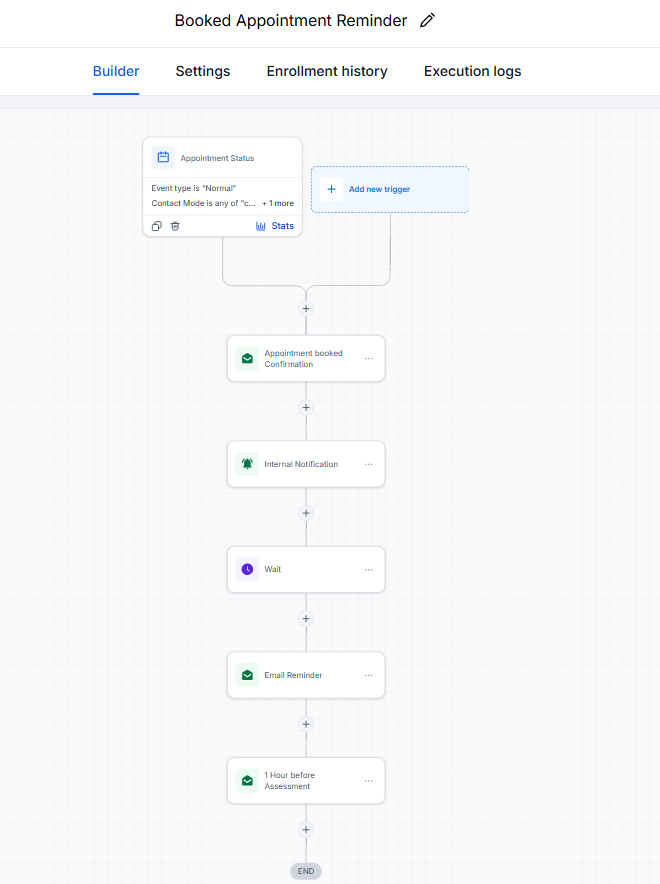
Click to zoom · Appointment Reminder Workflow
Turning Booked Appointments Into Showed Appointments
Booking a lead into a call or assessment is only half the battle. The other half is making sure they actually show up. This workflow handles everything from the instant confirmation to the final 1-hour reminder — so no-shows drop without anyone having to manually follow up.
It also keeps the internal team aligned by notifying staff the moment a booking comes in, so they can prepare for the consultation in advance.
No-Shows Kill Conversion Rates
A no-show doesn't just waste the time slot — it resets the entire sales process. The lead has to be re-engaged, re-booked, and re-warmed. Without a reminder sequence, no-show rates for free consultations can run as high as 40–60%.
This three-touch sequence (instant confirmation → day before → 1 hour before) is the minimum to bring that number down significantly. Every message has a job: the first builds trust, the second maintains commitment, the third creates urgency.
Key Takeaway
The difference between a business that closes deals and one that doesn't often comes down to whether they show up to the call. This workflow makes sure the lead shows up too — automatically, every time, without anyone having to remember to send a reminder.
Want Automation Like This Working for Your Business?
I'll build the full GHL system — CRM pipeline, lead intake workflow, and appointment reminder sequences — so no lead goes cold and no appointment gets forgotten.
Book a Growth & Automation Call